Web Development Roadmap for Beginners
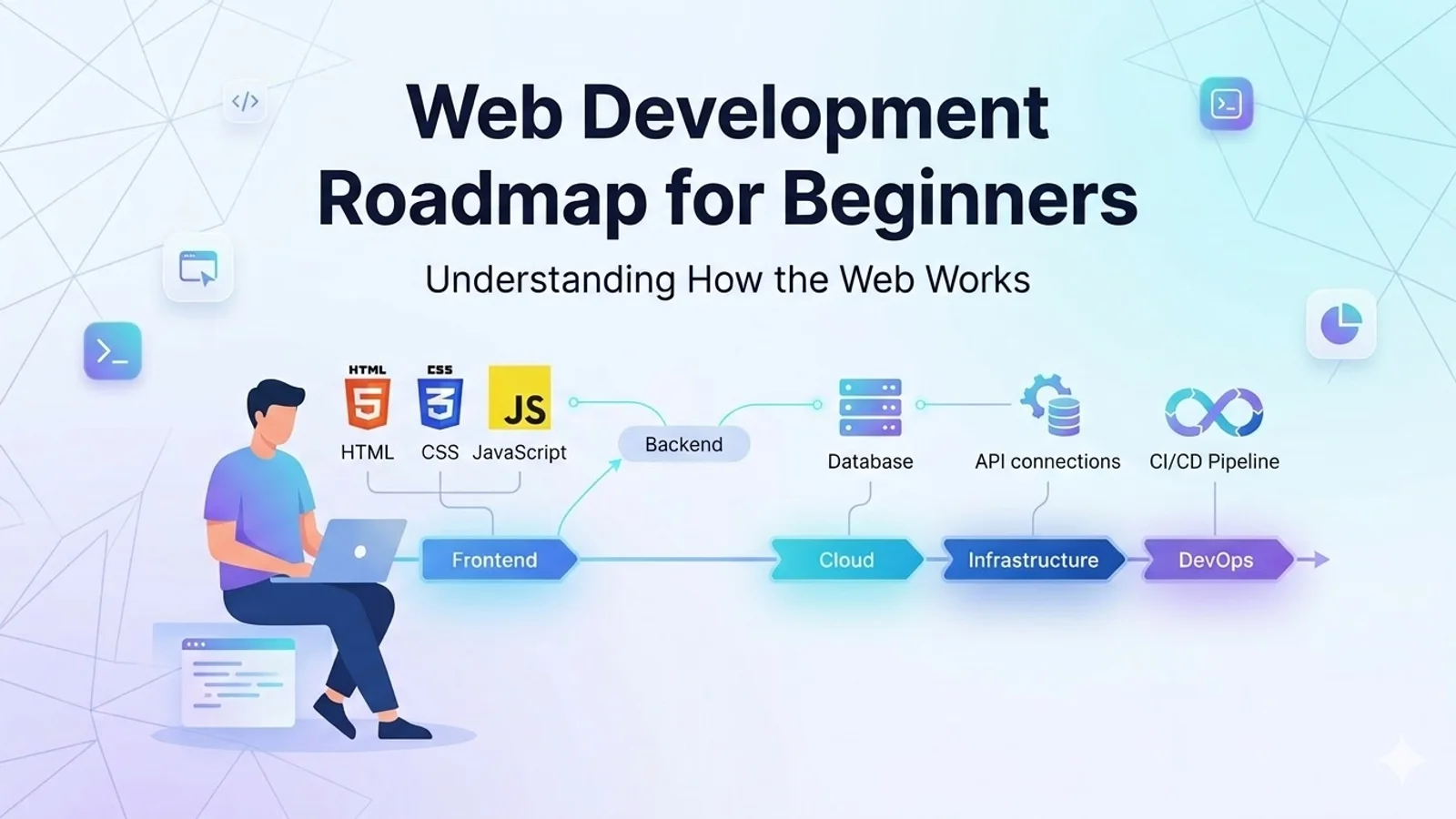
Learn the web development roadmap for beginners by understanding how the web works, including URLs, DNS, HTTP, web servers, and the difference between frontend and backend.
A Simple Guide to Understanding How the Web Works
Starting web development can feel confusing for beginners. There are many programming languages, tools, frameworks, and technologies, and it is often difficult to know where to begin.
Many people jump directly into coding without understanding how the web actually works. While learning programming languages is important, having a clear understanding of the fundamental systems behind the internet will make your learning journey much easier.
This beginner-friendly guide explains the core concepts of the web, including:
- Web development roadmap
- How browsers communicate with servers
- What URLs are and why they matter
- How DNS works
- Why HTTP and HTTPS are used
- The functionality of web servers
- The difference between frontend and backend development
- HTML, CSS, JavaScript, and Git basics
By the end of this guide, you will have a clear understanding of the foundation of web development.
Web Development Roadmap
Modern web development involves several different areas of technology. When beginners see the full technology stack, it may seem overwhelming.
A typical web development ecosystem includes:
However, beginners should not try to learn everything at once. The key is to build a strong foundation first and then gradually move toward advanced topics.
A good roadmap begins with understanding how the internet and web technologies work together before diving into frameworks and programming languages.
Initial Barriers When Learning Web Development
When people begin learning web development, they often face several common challenges.
The biggest challenge is confusion.
Beginners see many programming languages, frameworks, and development tools such as:
- JavaScript
- Python
- React
- Node.js
- Databases
- Hosting services
- Cloud platforms
Without a proper roadmap, it becomes difficult to understand what should be learned first.
This is why having a clear blueprint or learning path is extremely important. A structured roadmap helps you reach your goals with fewer distractions and less confusion.
Another important habit is learning how to verify your understanding.
Instead of focusing on making everything perfect, focus on understanding concepts and testing them yourself. Practical experimentation helps reinforce your learning.
Learning web development is similar to climbing a mountain. You start with small steps and gradually reach the top.
Instead of only preparing for jobs, try to build your own projects and products. Practical experience accelerates learning much faster than theory alone.
Is the Web Really That Complex?
Many beginners believe that the internet operates through extremely complex systems.
In reality, the web follows a well-structured architecture.
Before writing code, it is important to understand how websites actually work behind the scenes.
The web operates on a system known as the client–server model.
In this model:
- The client is your browser (Chrome, Firefox, Safari, etc.)
- The server is the computer that stores website files and responds to requests
When you open a website, your browser sends a request to a server. The server then responds by sending the necessary files back to the browser.
These standards and technologies are maintained by the World Wide Web Consortium (W3C) , which defines how web technologies should operate.
Understanding this simple model helps beginners see how the web functions as a connected ecosystem.
Recommended Learning Sequence for Web Development
Before diving into programming languages or frameworks, beginners should first understand the core systems that power the internet.
A practical learning sequence includes:
- Why URLs are important and how they work
- Understanding DNS operations
- Why HTTP or HTTPS appears before domain names
- Understanding the functionality of web servers
- Learning the difference between frontend and backend
- Learning HTML, CSS, JavaScript, and Git fundamentals
Once these fundamentals are clear, learning coding languages becomes much easier.
How Browsers Handle a Website Request
Let’s imagine you type a website address into your browser:
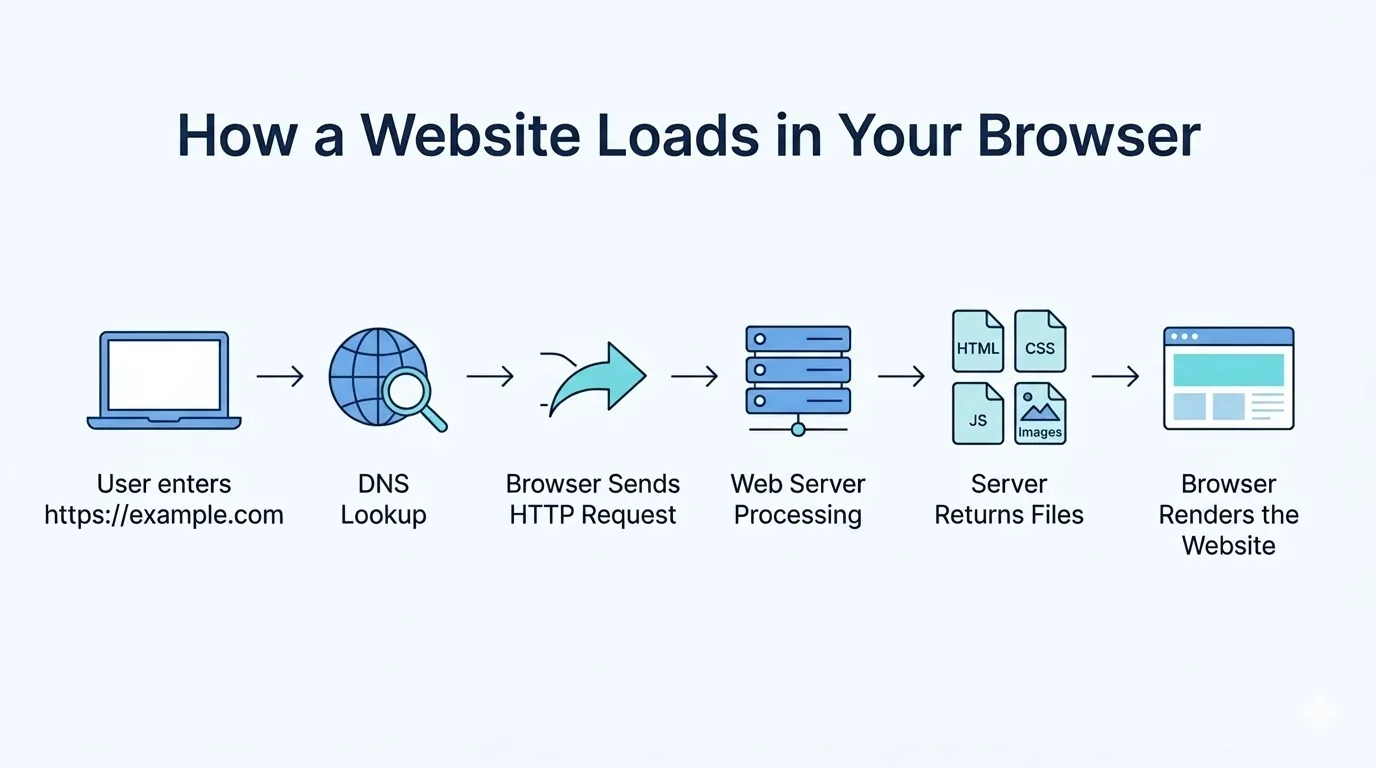
When you press Enter, the browser begins a chain of events that happens within milliseconds.
Although it looks like a simple action, many processes occur behind the scenes:
- The browser analyzes the URL
- DNS converts the domain name into an IP address
- The browser connects to the web server
- The server sends the required files
- The browser renders the webpage
This entire process happens extremely quickly, usually in just a few milliseconds.
Understanding URL Structure
A URL works like the address system of the internet.
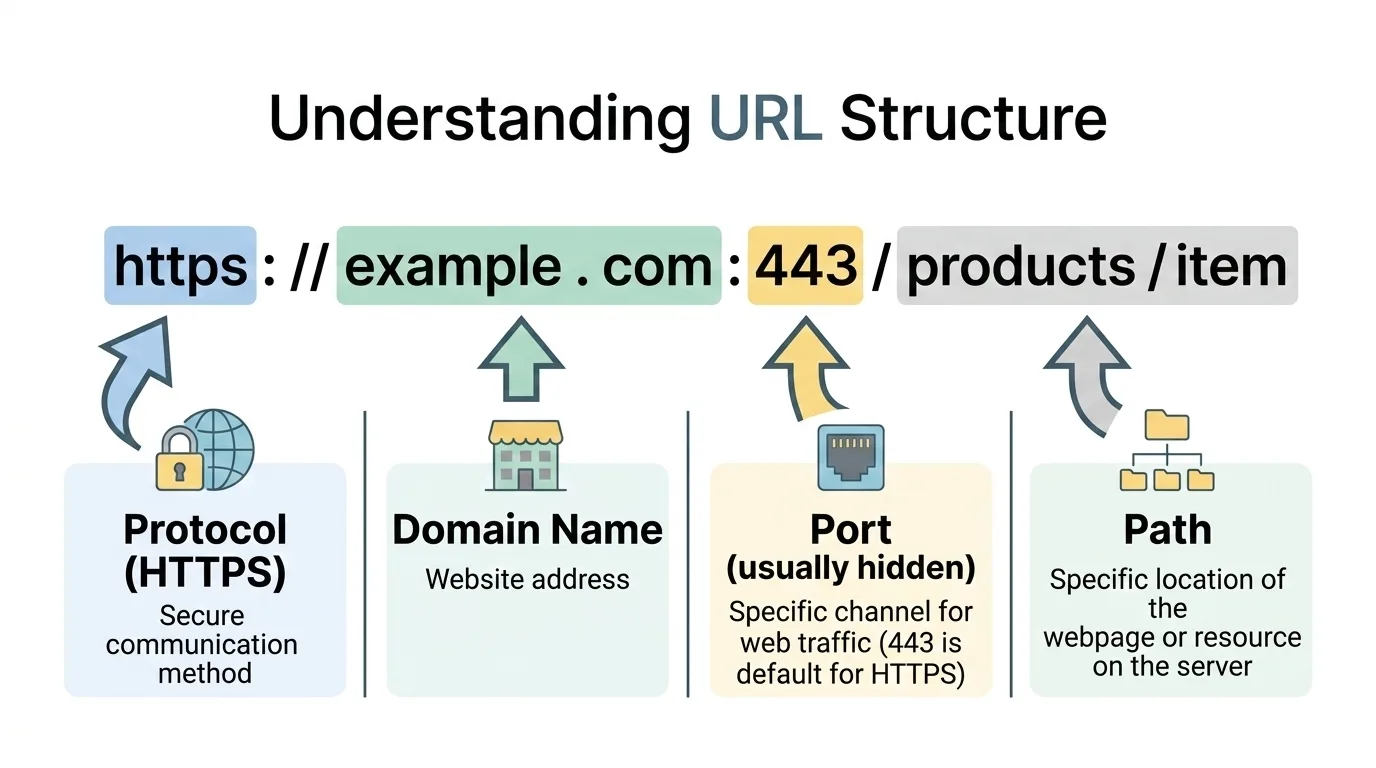
Just as a physical address identifies a building, a URL identifies the location of a resource on the web.
Example URL:
This address contains several components that help browsers communicate with servers.
Protocol (Scheme)
The first part of the URL is called the protocol.
Examples include:
- HTTP
- HTTPS
The protocol defines how the browser communicates with the server.
Domain Name
The domain name is the human-readable name of the website.
Example:
Instead of remembering numerical IP addresses, users can access websites using simple domain names.
Port
Ports represent communication channels between the browser and the server.
Common ports include:
Most browsers automatically assume these ports, so users do not usually see them in the URL.
Path
The path represents the specific page or resource requested on the website.
Examples include:
In most cases, users only type the domain name, and the browser automatically fills in the remaining details.
Why URLs Are Important
URLs are the foundation of the World Wide Web
Without URLs, browsers would not know:
- Which server to contact
- Which resource to request
- What content should be displayed
Every resource on the internet has its own unique URL.
This includes:
- Webpages
- Images
- Videos
- PDF files
- API endpoints
- Scripts and stylesheets
Without a URL, the resource would remain unknown to the web.
Understanding DNS (Domain Name System)
DNS stands for Domain Name System.
DNS works like the phonebook of the internet.
Humans use domain names such as:
But computers communicate using IP addresses, such as:
DNS converts human-friendly domain names into numerical IP addresses so computers can locate the correct server.
Without DNS, users would have to remember complex numerical addresses for every website.
DNS Resolution Process (Step by Step)
When a browser needs to find the IP address of a website, it performs a process called DNS resolution.
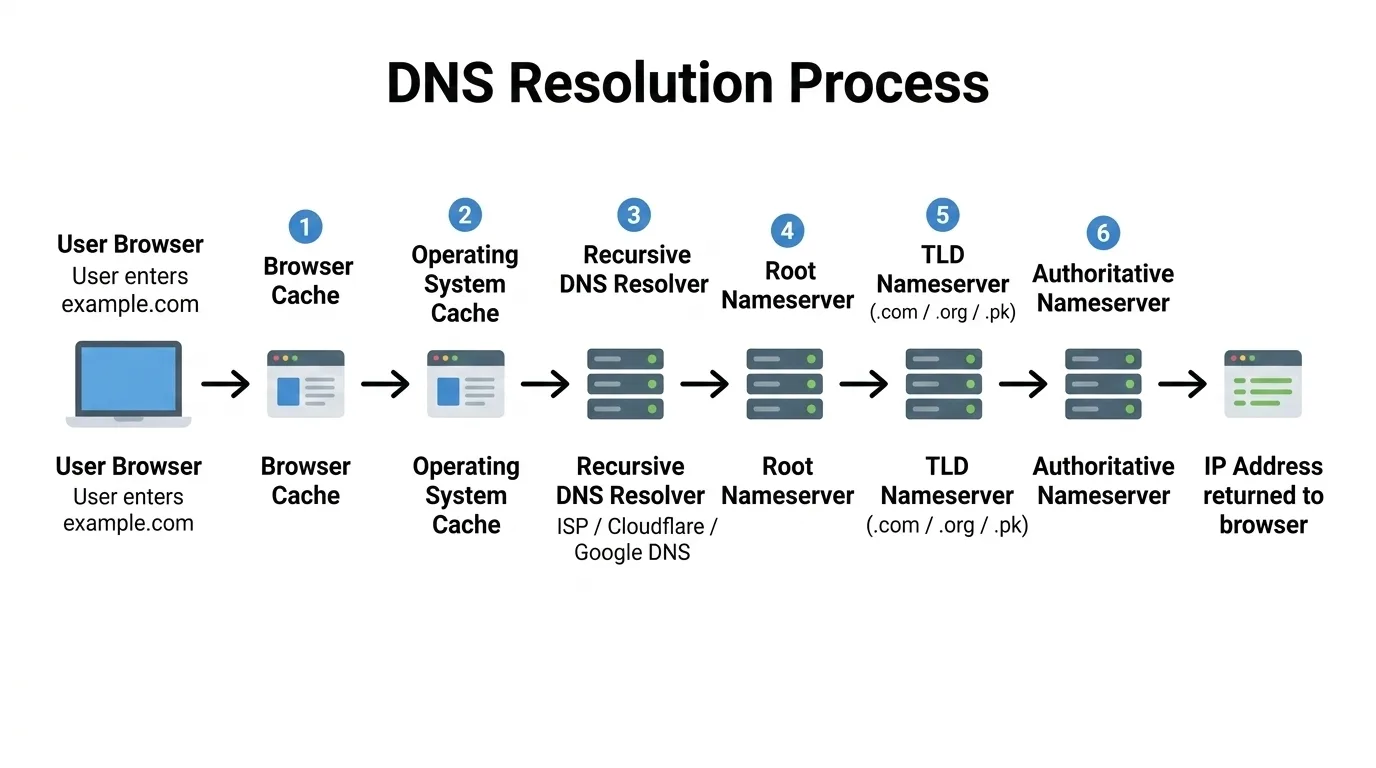
Browser Cache
First, the browser checks its DNS cache.
Browsers store IP addresses of recently visited websites to speed up future requests.
If the IP address is already stored, the browser uses it immediately.
Operating System Cache
If the browser cannot find the record, the system checks the operating system DNS cache.
Both Windows and macOS maintain local DNS records.
Recursive DNS Resolver
If the record is still not found, the request is sent to a recursive DNS resolver, typically provided by the Internet Service Provider.
Popular public DNS resolvers include:
- Cloudflare → 1.1.1.1
- Google → 8.8.8.8
- Quad9 → 9.9.9.9
These resolvers search for the correct IP address on behalf of the browser.
Root Nameservers
If the resolver does not know the answer, it queries a root nameserver.
Root servers are the starting point of the DNS hierarchy. There are 13 logical root server systems, supported by hundreds of physical servers around the world.
The root server directs the resolver toward the appropriate Top-Level Domain (TLD) server.
TLD Nameservers
Next, the resolver contacts the Top-Level Domain server responsible for the domain extension.
Different organizations manage these domains.
For example:
The TLD server returns the authoritative nameservers responsible for the specific domain.
Authoritative Nameservers
The resolver now contacts the authoritative nameserver for the domain.
These servers contain the real DNS records configured by the domain owner.
Common DNS providers include:
- Cloudflare
- AWS Route 53
- GoDaddy
- Namecheap
These servers return the final IP address.
Response Returned and Cached
Once the correct IP address is found, it is returned to the browser.
The browser then connects to the server and loads the website.
The result is cached for a period defined by TTL (Time To Live) so future visits are much faster.
Why HTTP or HTTPS Appears Before Domain Names
The part written before a domain name is called the protocol.
HTTP stands for HyperText Transfer Protocol. It defines the rules used for communication between a browser and a server.
HTTPS is the secure version of HTTP.
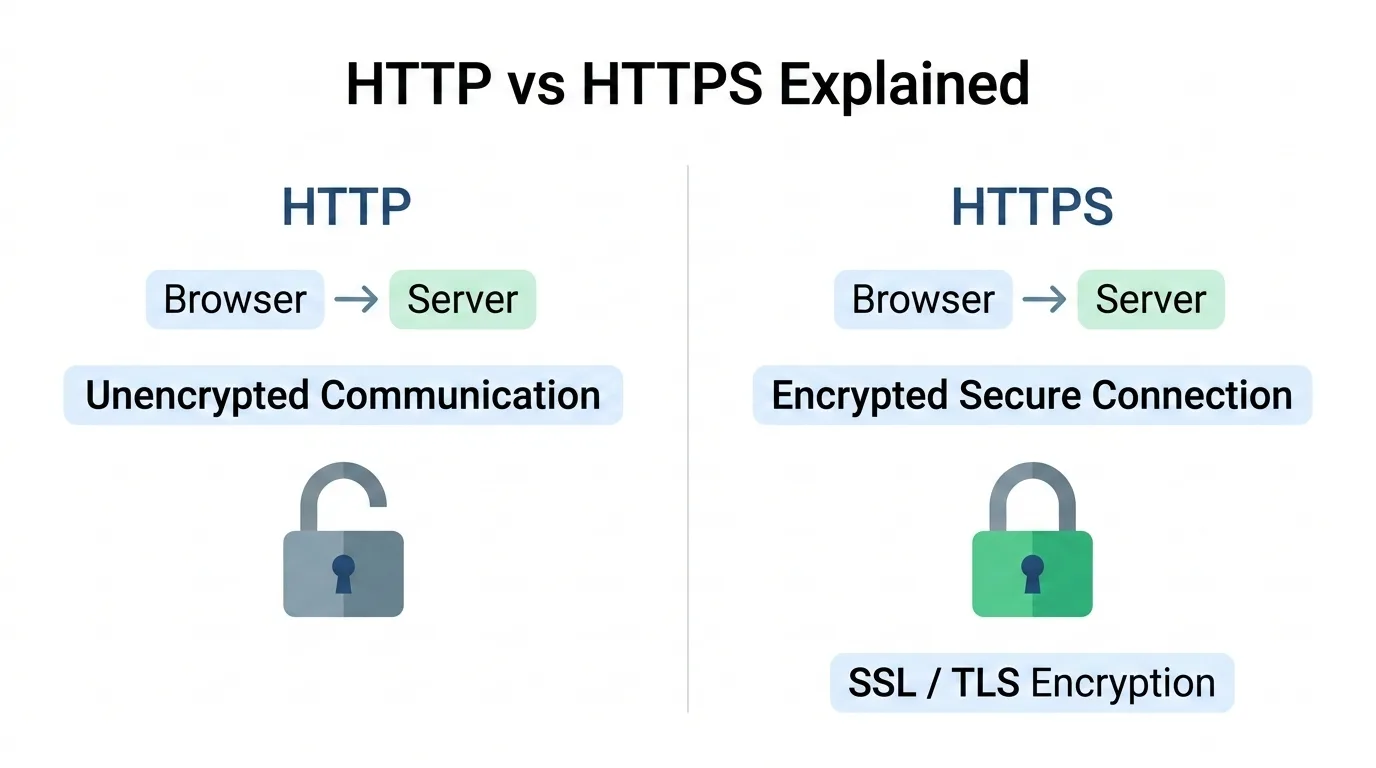
The extra S stands for Secure, meaning the communication between the browser and the server is encrypted using SSL/TLS.
This protects sensitive information such as:
- Passwords
- Login credentials
- Payment information
Modern browsers prefer HTTPS and often mark HTTP websites as not secure.
Clear Functionality of a Web Server
A web server stores website files and delivers them when users request them.
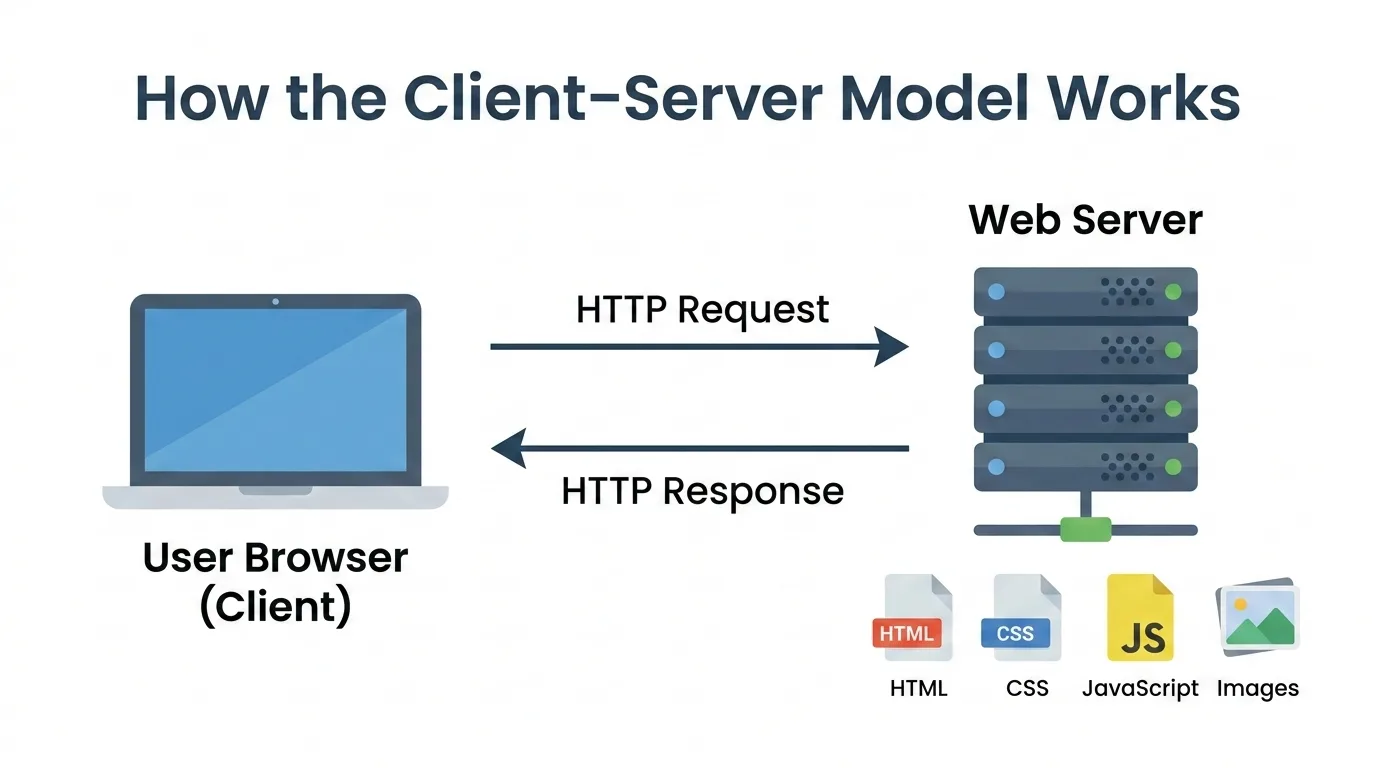
When a browser sends a request to a server, the server:
- Receives the request
- Finds the requested files
- Sends those files back to the browser
These files can include:
The browser then combines these files to display the webpage.
Difference Between Frontend and Backend
Modern web applications are divided into two major parts.
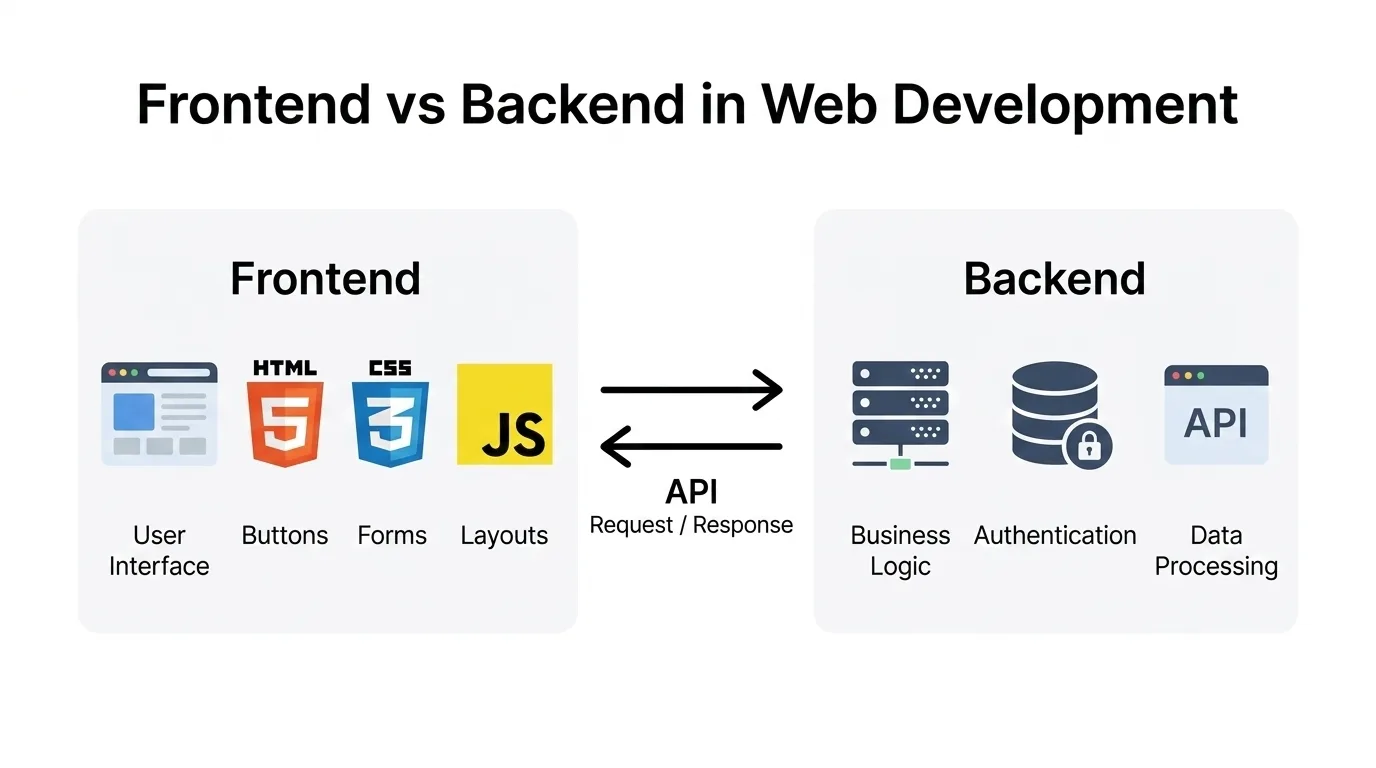
Frontend (User Interface)
The frontend is everything users see and interact with in their browser.
Examples include:
- Layout and design
- Navigation menus
- Forms and buttons
- Images and animations
Frontend technologies include:
Frameworks such as React, Vue, and Angular help build advanced user interfaces.
Backend (Server Logic)
The backend runs on the server and manages application logic.
It handles tasks such as:
- Data storage
- Authentication
- Business logic
- API communication
Backend technologies include:
- Python
- Node.js
- Java
- PHP
- Go
Databases such as MySQL, PostgreSQL, and MongoDB store application data.
How Frontend and Backend Work Together
When a user interacts with a website:
- The frontend collects the user input
- The request is sent to the backend
- The backend processes the request
- The response is returned to the frontend
- The browser updates the interface
In simple terms:
Learn HTML (The Structure of the Web)
HTML (HyperText Markup Language) is the foundation of every website.
HTML defines the structure of a webpage using elements such as headings, paragraphs, images, links, and forms.
Example HTML structure:
<!DOCTYPE html>
<html>
<head>
  <title>Example Page</title>
</head>
<body>
  <h1>Hello World</h1>
  <p>This is a simple webpage.</p>
</body>
</html>
Every web developer should understand HTML before moving to more advanced technologies.
CSS Fundamentals
CSS (Cascading Style Sheets) controls the visual appearance of websites.
While HTML creates the structure of a webpage, CSS controls how that page looks.
With CSS you can change:
- Colors
- Fonts
- Layout
- Spacing
- Animations
- Responsive design for mobile devices
For example, HTML may define a heading like this:
<h1>Welcome</h1> CSS can then style it like this:
h1 { color: blue; font-size: 32px; }Now the browser knows how the heading should appear on the page.
One of the most important ideas in CSS is the cascade. This means styles can come from different places, and the browser decides which rule should apply.
Another important concept is the box model.
Every element on a webpage behaves like a box that includes:
- Content
- Padding
- Border
- Margin
Understanding the box model helps developers control spacing and layout on a page.
Modern CSS also includes powerful tools such as:
- Flexbox
- Grid
- Media queries
Once you understand these fundamentals, designing webpages becomes much easier.
JavaScript Programming
JavaScript is the programming language that powers interactive web applications.
It allows developers to create dynamic behavior such as:
- Form validation
- Interactive buttons
- Dynamic page updates
- API communication
Modern web development heavily relies on JavaScript for building complex applications.
Frontend Frameworks
After learning HTML, CSS, and JavaScript, developers often use frontend frameworks.
Popular frameworks include:
- React
- Vue
- Angular
These frameworks help build scalable user interfaces and manage application state efficiently.
Backend Development
Backend development handles server logic and data processing.
Common backend technologies include:
- Node.js
- Python
- Java
- PHP
- Go
Backend systems communicate with databases and APIs to serve data to the frontend.
Databases
Databases store the data used by web applications.
Common databases include:
- MySQL
- PostgreSQL
- MongoDB
- SQLite
Developers use databases to store user accounts, application data, and content.
Web Hosting
Once an application is built, it must be deployed so users can access it.
Common hosting platforms include:
- Vercel
- Netlify
- AWS
- DigitalOcean
Deployment makes your website accessible to users around the world.
Git Version Control
Git is a version control system used by developers to track changes in code.
When building software or websites, code is constantly updated and improved. Git helps developers keep track of every change made to a project.
Instead of saving multiple copies of files like these:
- project-final
- project-final2
- project-final-really-final
Git manages the entire history of the project automatically.
With Git you can:
- Track changes in code
- Restore previous versions of files
- Collaborate with other developers
- Work on new features without breaking existing code
A common Git workflow looks like this:
- Write code
- Save changes using a commit
- Push the changes to a remote repository
Platforms such as GitHub, GitLab, and Bitbucket host Git repositories online.
This allows teams to collaborate on the same project from anywhere in the world.
Git also allows developers to create branches, which are separate versions of the code used for experimenting or developing new features.
Once the feature is ready, the branch can be merged back into the main project.
Version control is considered one of the most essential tools in modern software development.
Even beginner developers should learn Git early in their journey because it makes managing projects safer, more organized, and easier to collaborate on.
Verify Your Understanding Using Your Browser
One of the best ways to understand how the web works is by exploring websites using browser developer tools.
Modern browsers include built-in tools called Inspect Mode or Developer Tools.
Opening Developer Tools
You can open developer tools by:
- Right-clicking on a webpage and selecting Inspect
Or by using shortcuts:
Elements Tab
The Elements tab displays the HTML structure of the page.
Here you can explore:
- Page layout
- HTML tags
- Images and components
- CSS styling
Network Tab
The Network tab shows how the browser loads a webpage.
To observe this process:
- Open the Network tab
- Refresh the page
You will see various files loading, such as:
Each request displays information like:
- Request URL
- Response status
- File size
- Loading time
This helps you understand how browsers communicate with web servers in real time.
Final Thoughts
Understanding how the web works is one of the most important steps for beginners in web development.
Instead of rushing directly into coding frameworks, taking the time to learn these fundamental concepts will give you a much stronger foundation.
Once you understand:
- URLs
- DNS
- HTTP/HTTPS
- Web servers
- Frontend and backend
- HTML, CSS, JavaScript, and Git
You will find it much easier to learn programming and build real web applications.
Web development becomes far less confusing when you understand how all the pieces of the internet fit together.
Frequently Asked Questions
What is web development?
Web development is the process of building and maintaining websites or web applications. It includes creating the user interface (frontend), developing server-side logic (backend), managing databases, and ensuring websites function properly across different devices and browsers.
What should I learn first in web development?
Beginners should start by understanding how the web works and then learn the core technologies of the web: HTML, CSS, and JavaScript. HTML provides the structure of a webpage, CSS controls the layout and styling, and JavaScript adds interactivity and dynamic behaviour.
What is the difference between frontend and backend?
Frontend development focuses on the parts of a website that users see and interact with, such as layout, buttons, forms, and animations. Backend development handles the server-side logic, databases, authentication, and APIs that process data and power the application behind the scenes.
How does a website work on the internet?
When you enter a website address in your browser, the browser sends a request to a server. DNS converts the domain name into an IP address, the server responds by sending website files such as HTML, CSS, and JavaScript, and the browser renders those files to display the webpage.
How long does it take to become a web developer?
The time required to become a web developer depends on learning pace and practice. Many beginners can learn the basics within 3–6 months, while becoming job-ready usually takes 6–12 months of consistent learning and building projects.
What skills are required for web development?
Key skills for web development include understanding HTML, CSS, and JavaScript, problem-solving abilities, knowledge of frontend and backend development, working with databases, using version control tools like Git, and learning how to deploy and maintain web applications.